Before you begin: error 0xC004C020 does not always mean your license is invalid. It usually means Windows needs additional activation steps. Keep your valid product key available and use telephone activation to complete the process.
1. Confirm the activation error
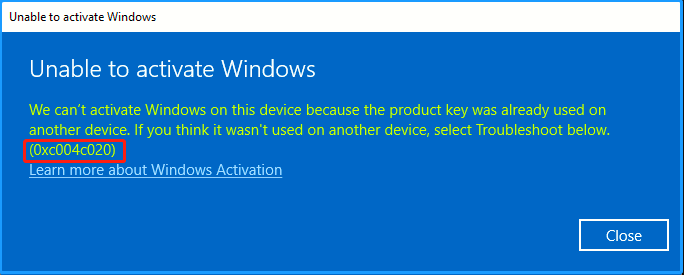
Open the Windows activation page and confirm that the message shows 0xC004C020. The wording may say that the product key was already used on another device.


2. Open telephone activation with slui 4
Press Windows + R, type slui 4, and select OK. This opens the telephone activation wizard, which is the usual way to resolve this error when the key is valid for the installed edition.

3. Copy the Installation ID
Select your country or region and continue. The wizard displays an Installation ID (IID). Copy every group in the original order.

4. Get your Confirmation ID
Use one of these methods to exchange the Installation ID for a Confirmation ID (CID):
- Microsoft Product Activation Portal: the official, free option. It is manual: sign in, choose product activation, select Windows, and enter the IID groups.
- InstantLicX Telegram bot: a faster paid option. Send the IID to the Telegram bot as text or as an image.
- GetCID.xyz: a paid web service that accepts the IID as text or image and also supports API, WordPress, WhatsApp, and Telegram integrations.
Using the free Microsoft portal
Open the Microsoft Product Activation Portal, sign in with a Microsoft account such as Outlook or Hotmail, and choose Activate a Microsoft Product.

Select Windows, choose the Windows version that matches your installation, and continue until the portal requests the Installation ID.


Paste the complete Installation ID, verify the groups, and submit it.

If the portal asks how many computers have been installed with this copy and this is a new activation, enter 0.

5. Enter the Confirmation ID
After the IID is accepted, the selected method returns a Confirmation ID divided into groups.

Return to the Windows activation wizard and enter each CID group into its corresponding field. Select Activate Windows to finish.

6. Verify activation
Return to the Windows activation page after entering the CID. If the key, edition, and CID are correct, Windows should now show an activated state.

If the error remains
- Verify that the installed Windows edition matches the product key.
- Install pending Windows updates, restart, and try telephone activation again.
- Check that the IID and CID groups were copied in the correct order.
- If Windows was upgraded from another edition, confirm that the edition change completed successfully before activating.
Need a license?
Buy affordable software licenses
Get Office, Windows, antivirus licenses, and activation help through our official stores.


 GGSEL Store
Are you a reseller?
Build your own license business
Sell digital products through your own Telegram license business or connect HydraCID X to your store by API.